
The backlog is the holding area for delivery work that is not yet ready for the active sprint. It is also where you refine stories before they are scheduled.
Understand the hierarchy
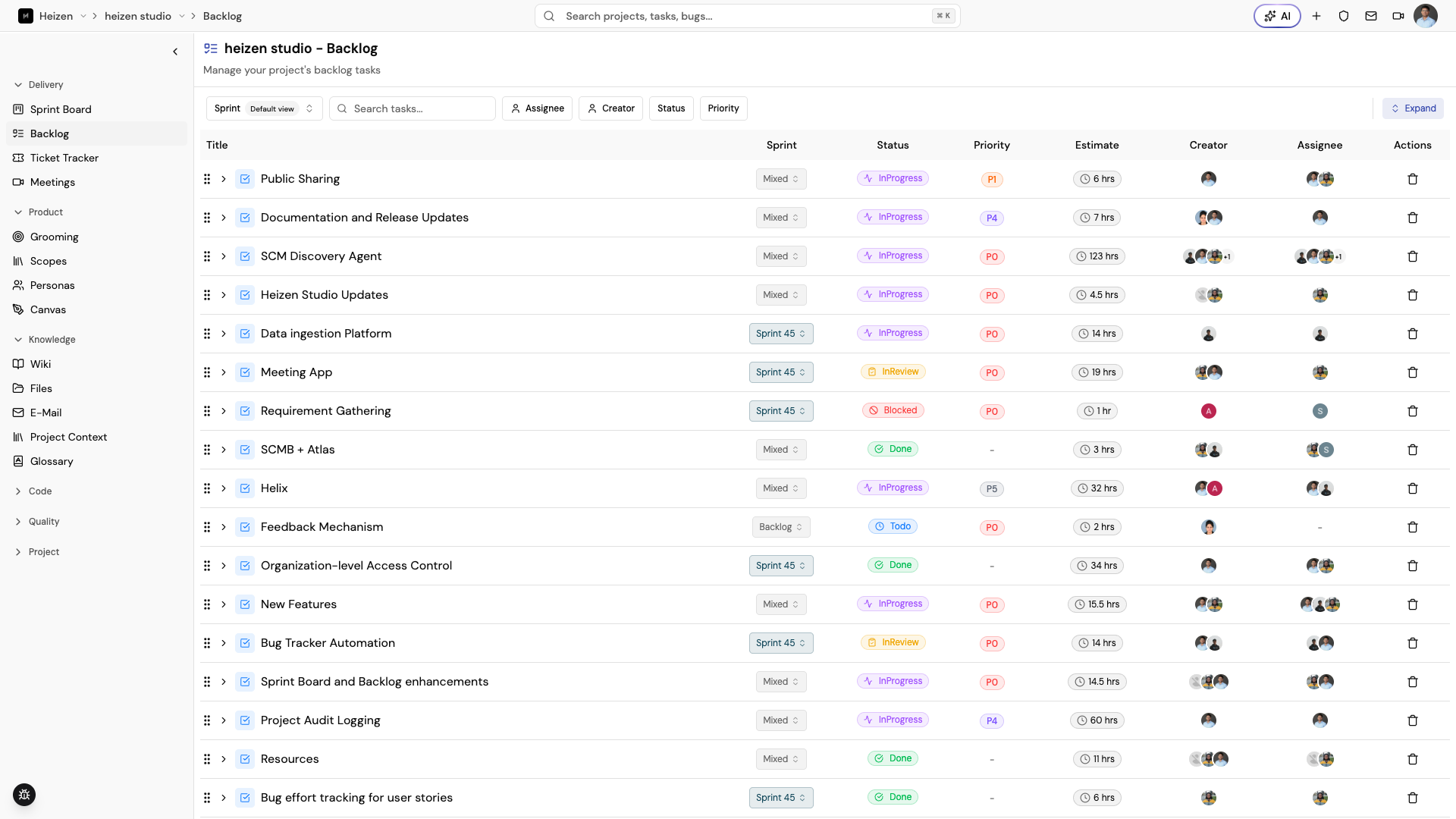
The backlog groups work into tasks and their user stories. A story can remain unassigned to a sprint, or be associated with an active or completed sprint. Open a story to edit its detail without leaving the backlog. The story whose panel is open is highlighted in the list. Creating a story from the backlog opens its detail panel automatically.
Find the work you need
- Use Search tasks… for a text search.
- Use the Sprint filter to include active sprints, completed sprints, or work with no sprint.
- Filter stories by assignee, creator, status, or priority.
- Expand or collapse task groups to focus on a slice of the backlog.
- Clear filters when an empty result is caused by the current view rather than missing data.
Refine a story
Review the title, description, acceptance criteria, priority, estimate, assignee, and target sprint. Add comments when a decision needs a conversation rather than a silent edit.
Move work into a sprint
Assign a ready story to a sprint from its detail panel or move it from the backlog into the Sprint Board. Add tasks when the story is ready but the execution steps need to be distributed across the team.