
An answer is only as useful as your ability to check it. Helix now cites its sources inline, so every claim in a reply points at the record or page it came from.
Citations you can click
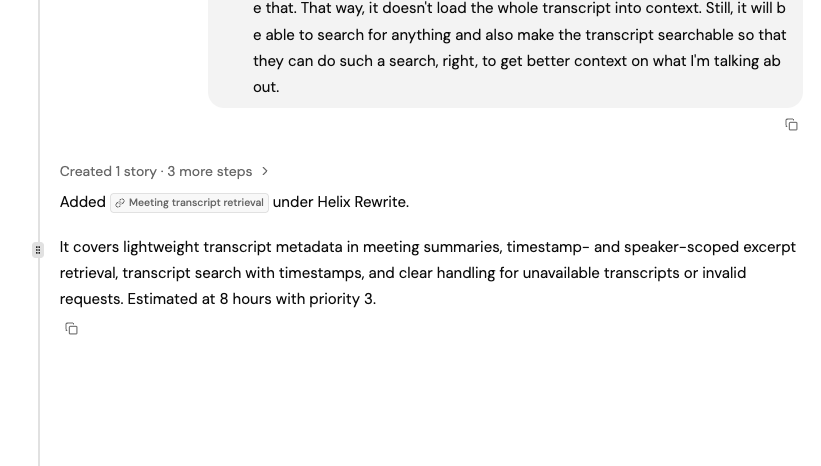
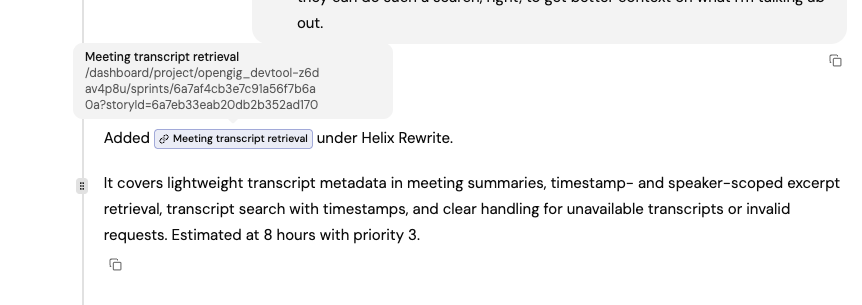
A citation renders as a small labelled chip in the middle of the sentence it supports — the publication or site for a web source, the record’s title for something in your project. Hovering shows the full destination; clicking opens it.
Because citations are inline, they survive wherever the text goes: inside a table cell, a bullet, or a bold run. A reply that compares three requirements can cite each one on its own row.
Long conversations stay predictable
Every Helix agent now works inside an explicit input budget, and older context is trimmed to fit before a request is sent rather than failing once a conversation grows past the model’s limit. Prototype exploration runs under its own budget, since a browsing session collects far more text than a chat turn.
Context usage is recorded per turn, which is what lets the team see which conversations are approaching their ceiling and tune the limits from real numbers instead of guesses.
Also fixed
Mentions typed into the Helix input keep their underlying record ids, so a request that names a story or sprint resolves to that exact record instead of a text match.