---
title: "Ticket Tracker"
description: "Capture bugs and feature requests with evidence, triage them, and connect fixes back to delivery and QA."
---
> Documentation Index
> Fetch the complete documentation index at: https://docs.heizen.work/llms.txt
> Use this file to discover all available pages before exploring further.
# Ticket Tracker
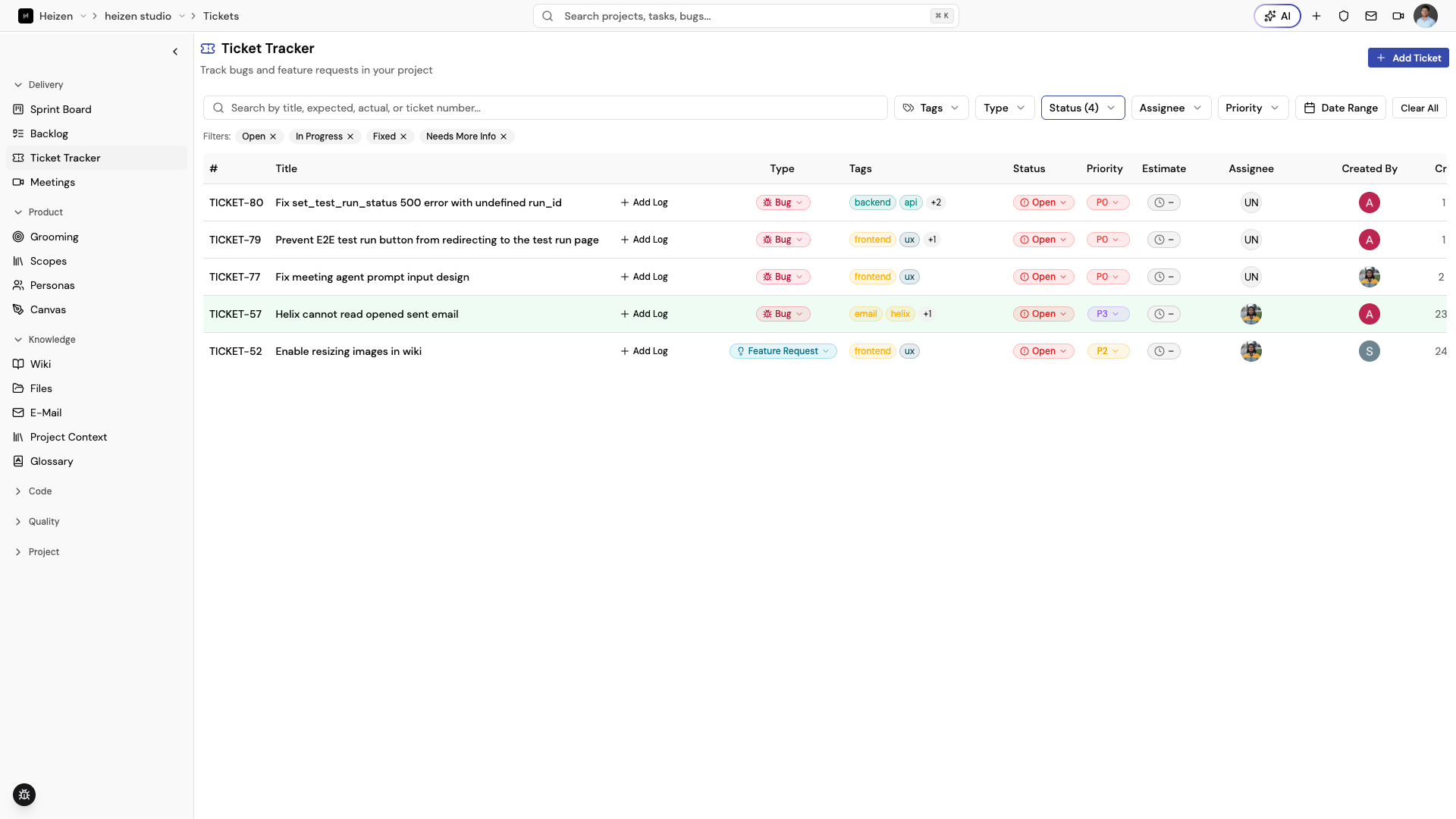
**Delivery → Ticket Tracker** is the project's single queue for defects and
feature requests. Every ticket has a **Ticket Type** (`Bug` or
`Feature Request`) so bug fixes and enhancement asks live side by side without
losing their distinct workflow, plus the supporting detail — tags,
screenshots, video, and voice feedback — so the person picking it up does not
need to reconstruct the problem from a short title. Bugs capture an actual
result and an expected result; feature requests capture only the requested
feature.
## Report a ticket
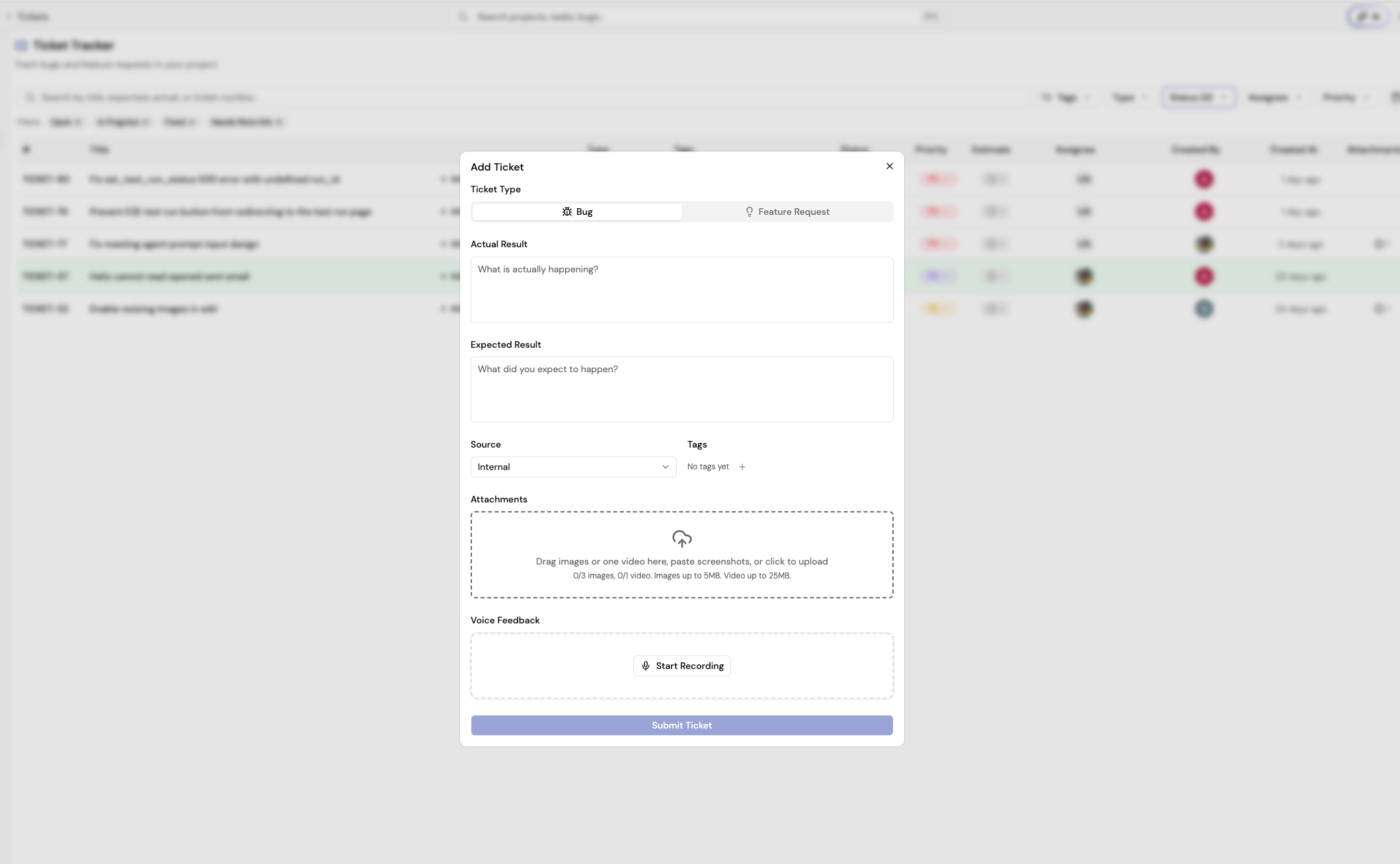
1. Choose **Report Bug** or **Request Feature**. The dialog opens with that
type preselected.
2. If you picked the wrong one, switch it under **What are you reporting?**
at the top of the form. The type decides which fields the form shows.
3. Describe the work:
- For a **Bug**, fill in the **Actual Result** and the **Expected Result**.
- For a **Feature Request**, describe the **Requested Feature**. The actual
result field is hidden, because there is no broken behavior to record.
4. Choose the **Source**: **Internal** or **External**.
5. Add tags such as `frontend`, `backend`, or `api`.
6. Attach screenshots, one video, or voice feedback when it will reduce
ambiguity.
7. Choose **Submit Bug Report** or **Submit Feature Request**.
At least one useful piece of evidence is required. For a bug, a detailed
actual/expected pair is the best default; for a feature request, a specific
requested-feature description is.
The ticket detail panel follows the same rule: a bug shows both actual and
expected result, while a feature request shows only the requested feature. The
panel header shows the ticket's **TICKET-\{number\}** at the top left.
You can change a ticket's type later from the table — choose the type badge on
any row to switch between **Bug** and **Feature Request** as understanding of
the work evolves.
## Create a ticket from a repository issue
Tickets can also start from a connected repository's issues. Open the issue in
[Source](/studio/code#issues) and choose **Convert to Ticket**. The new ticket
is tagged with the provider (GitHub, GitLab, or Bitbucket), includes the issue
description and a link back to the source issue, and gets a normal
**TICKET-\{number\}**. An issue can only be converted once; after that, the issue
links to its ticket.
## Add in-app reporting with the Bugs SDK
The `@heizen-labs/bugs-sdk` package adds a floating React bug-report widget.
Users can submit a description with screenshots, screen recordings, uploaded
media, page context, and application metadata directly from your app. Reports
submitted through the SDK land in the Ticket Tracker as **Bug** tickets.
### Install the package
```sh
npm install @heizen-labs/bugs-sdk
pnpm add @heizen-labs/bugs-sdk
yarn add @heizen-labs/bugs-sdk
bun add @heizen-labs/bugs-sdk
```
The package requires React 19 or later and has no separate CSS import. Render
`BugsSdk` once near the root of the application:
```tsx
import { BugsSdk } from "@heizen-labs/bugs-sdk";
export function App() {
return ;
}
```
The widget renders a floating **Report bug** button in the bottom-right corner
by default.
### Configure the widget
```tsx
```
| Prop | Type | Default | Purpose |
| ----------------- | ----------------------------------------------------------------------------- | -------------------------- | -------------------------------------------------------------------------- |
| `apiKey` | `string` | required | API key used to submit reports. |
| `defaultPosition` | `top-left`, `top-right`, `bottom-left`, `bottom-right`, `left`, `right` | `bottom-right` | Widget position. `left` and `right` are legacy aliases for bottom corners. |
| `endpoint` | `string` | Heizen bug-report endpoint | Override the submission endpoint. |
| `metadata` | `Record` | — | Attach user, environment, feature-flag, or other context. |
| `source` | `string` | `feedback-widget` | Identify the app or surface that submitted the report. |
### What reports contain
A submitted report can include:
- the user-written description;
- screenshots, screen recordings, or uploaded image, audio, and video files;
- page URL, title, viewport dimensions, and browser information;
- custom metadata from the `metadata` prop; and
- the value of the `source` prop.
Each report supports up to five files, each file can be up to 25 MB, and only
one video is allowed. Screen recordings are limited to 60 seconds.
### Add it to Next.js
For the App Router, render the SDK from a client component and include that
component in the root layout:
```tsx
// app/bugs-sdk-client.tsx
"use client";
import { BugsSdk } from "@heizen-labs/bugs-sdk";
export function BugsSdkClient() {
return ;
}
```
```tsx
// app/layout.tsx
import { BugsSdkClient } from "./bugs-sdk-client";
export default function RootLayout({
children,
}: {
children: React.ReactNode;
}) {
return (
{children}
);
}
```
The same render-once pattern works with Vite, Remix, Create React App, and
other React 19 applications.
## Triage the queue
Search by title, requested feature or expected result, actual result, or
ticket number. Combine
filters for ticket type, tags, status, assignee, priority, and date range. The
tracker includes statuses such as **Open**, **In Progress**, **Fixed**,
**Closed**, **Working as Intended**, **Needs More Info**, and
**Deprioritised**.
Open a ticket to update status, priority, assignee, tags, comments,
attachments, and linked pull requests. Add a comment when the ticket needs
clarification or the decision should remain visible to the reporter. Use **Add
Log** on a row to record time spent directly from the table.
A **Feature Request** ticket can be promoted with **Convert to task** once it
is scoped, moving it into the backlog as a **Feature** task with a story instead
of staying in the ticket queue.
Open a bug and choose **Fix with Helix** to hand it to an [agent
run](/studio/helix#agent-runs-from-a-ticket-or-story) instead of fixing it by hand.
## Connect a ticket to delivery and QA
When a bug is confirmed, assign it to the person fixing it and link the pull
request when available. When it is fixed, verify the behavior and close it only
after the relevant [test coverage](/studio/qa) or regression case is in place.
> **Turn repeatable fixes into regression coverage**
>
> A fixed bug is a useful input for a regression test. Capture the original
> behavior and expected result in the QA repository so the defect does not
> silently return.
Source: https://docs.heizen.work/studio/delivery/tickets/index.mdx